The official music video behind any song, locked to the song
OpenCanvas finds a song's official music video, checks that it really is the same recording, measures how the two timelines line up, and keeps the picture on the right second — through seeks, skips and the edits a music video makes to its song. It never loops.
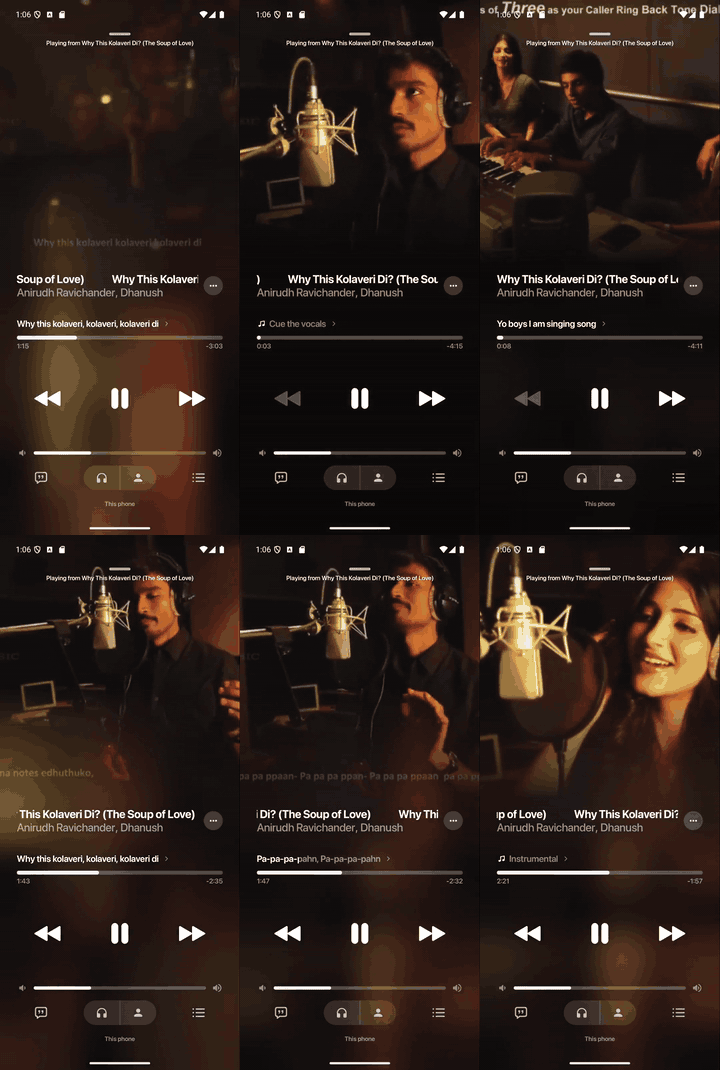
▶ full 38 s video
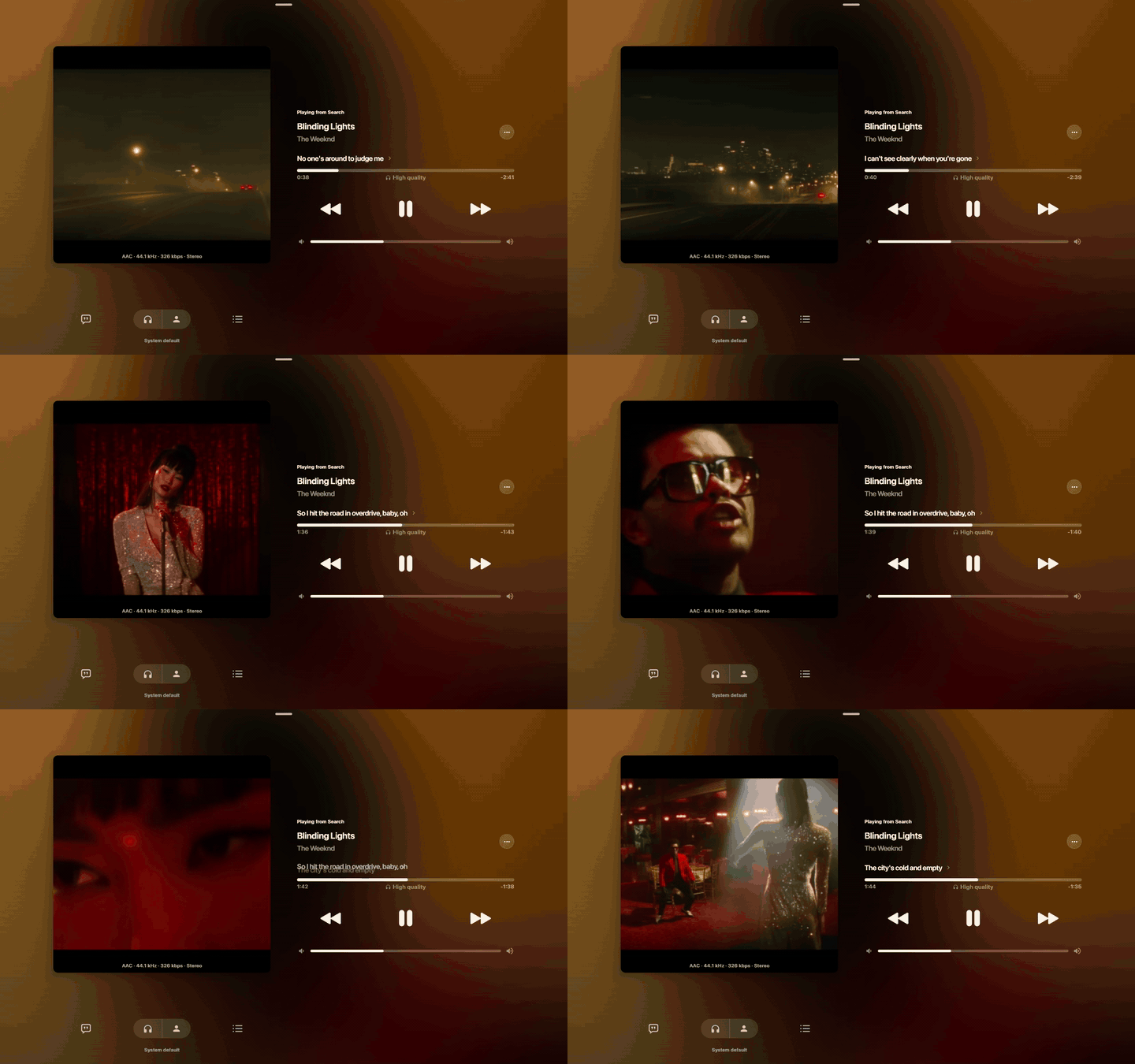
▶ full 20 s video
These are real screen captures. A screen recorder cannot capture an app's audio, so the soundtrack is the music video's own audio laid in at the position the picture shows; the measured drift between the app's song clock and the picture is in How close the picture stays.
(before publisher checks, 16 songs)
2000–2022
How it works
A music video is rarely the album track with pictures added: it has an intro and often edits — a bar repeated, a bar cut, a longer outro. A single constant offset is right for part of the song and wrong for the rest, so OpenCanvas measures a map: one offset per stretch of the song, and nothing for stretches the video has no scene for.
prefetch so the work begins before any screen asks.Why frame sizes, not audio
An AAC track is a sequence of frames, and each frame's size follows how loud and busy the music is at that instant. The table of sizes sits in the file's header (moov), so reading about 300 KB of each file yields a loudness-like curve for the song and for the video — nothing is downloaded in full and nothing is decoded. The curves (log of the size, minus a 3 s moving average, resampled to 50 Hz) are cross-correlated by FFT in 10 s windows (hop 5 s); a Viterbi pass picks one offset per window and charges for every change of offset, growing with the size of the change — a chorus a minute away is a different place, not an edit. Runs of windows with one offset become segments. The compute takes 12–63 ms.
Why bounded ranges
YouTube throttles an open-ended download of its adaptive streams to about 140 KiB/s — the 18 MiB 720p file takes ~132 s that way — but serves bounded ranges at line rate (1.8 s for the whole file). ProgressiveRangeSource opens with a small first range that doubles up to 4 MiB, and answers a seek with a small range at the new position first (about 106 ms to the first bytes). On Android the host uses 1 MiB chunks through a data source. Playback never waits for a whole file.
Locked to the song, not looping
CanvasSyncPolicy is the whole playback brain, pure Kotlin: inside each segment videoTime = songTime + offset. Every 250 ms (and at once when seekDetected sees the song jump) it answers Nudge (±5 % speed to absorb small drift), SeekTo (drift over 500 ms, or an edit point), Hold, Hidden (no matching picture here — show the cover) or Ended (the song outlasts the video — never loop). Tolerance is 150 ms.
One code path everywhere
The search, ranking, stream resolution, verification, alignment, cache and policy are one shared Kotlin source set used by Android and the desktop JVM — there is no per-platform sync and no daemon. A measured map is stored per (song, video) pair, so the next play needs no measuring (0–25 ms); sessions are shared, so a UI that restarts its request finds the work its predecessor started.
NEW IN THE KOTLIN CORE SOURCE
Keep the people in the picture.
YuNet faces, YOLOX-Nano people and a shot-aware camera replace the fixed center crop. Follow a subject, keep a group together, and show the whole scene when a tight crop would lose the action.
Illustrated detections, real camera policy: this comparison runs the native policy compiled to JavaScript. Face/person inference runs in Android and desktop hosts, not in this browser demo.
The worker consumes uncropped decoded frames, adapts its sampling rate to inference cost and caches trajectories by video, model revision and viewport. Cuts and seeks reset the camera; uncertain scenes use full-frame fit.
Integration, models and validation →Measured on one Windows desktop: reference image: 12 faces, 4 people; warm combined median about 24 ms. This is one image/device, not a battery or accuracy benchmark. Physical Android measurements remain outstanding. Current source APIs are newer than the published 1.0.0 artifact. Current validation report: 16-song smoke check and both Godavari tracks →
Benchmarks
Historical sync/stream baseline, measured before publisher-selection and subject-framing updates on one Windows 11 machine from an empty cache. These are not speed claims for the new path. Current framing results and limits appear above; repeat the matrix and stream tests with OPENCANVAS_MANUAL=1.
Cold start — 16 songs, 6 languages, 16 of 16 aligned
Median 550 ms to a playable stream (451–688 ms) and 954 ms to the map (596–1 688 ms, p90 1 139 ms). "Offset" is where the song starts on the video's timeline; many videos carry the same master (offset 0).
| Song | Language | Video | Length | Offset | Confidence | Stream ready | Map ready |
|---|---|---|---|---|---|---|---|
| The Weeknd — Blinding Lights | English | 4NRXx6U8ABQ | 262 s | +22.10 s | 0.60 | 0.69 s | 1.69 s |
| The Kid LAROI — STAY | English | kTJczUoc26U | 157 s | +19.36 s | 0.82 | 0.58 s | 1.10 s |
| Harry Styles — As It Was | English | H5v3kku4y6Q | 165 s | +0.00 s | 1.00 | 0.51 s | 0.68 s |
| Ed Sheeran — Shape of You | English | JGwWNGJdvx8 | 263 s | +0.00 s | 1.00 | 0.55 s | 0.88 s |
| Dua Lipa — Levitating | English | TUVcZfQe-Kw | 230 s | +0.00 s | 1.00 | 0.52 s | 0.73 s |
| Imagine Dragons — Believer | English | 7wtfhZwyrcc | 216 s | -0.33 s | 0.72 | 0.58 s | 0.97 s |
| Rema — Calm Down | English / Afrobeats | WcIcVapfqXw | 239 s | +0.00 s | 1.00 | 0.66 s | 0.97 s |
| Coldplay — Yellow | English (2000) | yKNxeF4KMsY | 272 s | +0.00 s | 1.00 | 0.59 s | 0.77 s |
| Arijit Singh — Tum Hi Ho | Hindi | vQ3HKnFVA2A | 264 s | +0.04 s | 0.64 | 0.53 s | 0.96 s |
| Badshah — Kala Chashma | Hindi / Punjabi | YvWKPU2mcLw | 198 s | +16.95 s | 0.76 | 0.55 s | 1.14 s |
| Dhanush — Why This Kolaveri Di | Tamil | YR12Z8f1Dh8 | 248 s | +0.00 s | 1.00 | 0.45 s | 0.60 s |
| Anirudh Ravichander — Vaathi Coming | Tamil | nIYZ4nbWq7w | 256 s | -0.00 s | 0.97 | 0.52 s | 0.97 s |
| Armaan Malik — Butta Bomma | Telugu | 2mDCVzruYzQ | 193 s | +0.00 s | 1.00 | 0.47 s | 0.60 s |
| BTS — Dynamite | Korean | gdZLi9oWNZg | 223 s | +22.80 s | 0.86 | 0.64 s | 0.95 s |
| Luis Fonsi — Despacito | Spanish | kJQP7kiw5Fk | 281 s | +0.00 s | 1.00 | 0.53 s | 0.72 s |
| PSY — Gangnam Style | Korean (2012) | 9bZkp7q19f0 | 252 s | +3.56 s | 0.44 | 0.58 s | 1.41 s |
Getting the stream
The same 720p file (18 MiB, 263 s).
| Way of getting it | First byte | First second | Whole file |
|---|---|---|---|
| yt-dlp -g (spawn, get the URL) | after 2.3–2.5 s | — | — |
| yt-dlp full download | — | — | 3.9–4.0 s |
| Plain HTTP GET of the file | 87 ms | 0.5 s | 132 s (throttled ≈140 KiB/s) |
| OpenCanvas ProgressiveRangeSource | 27 ms | 27 ms | 1.8 s |
| Seek to a random place, nothing buffered | median 106 ms to the first bytes of the new position | ||
480p: plain GET 132 s, ours 1.0 s. The 360p muxed stream is not throttled: 10 MiB in 1.1 s, first bytes in 53 ms. Resolving a stream URL takes 60–400 ms (median 143 ms for 360p).
How close the picture stays to the song
Android emulator (4 GB RAM, software video decoding, 360p). Logged song clock and video clock, plus frame-by-frame matching of the capture against the source video.
| What | Result |
|---|---|
| Video position vs. the map's target, settled (50 samples, restart + 2 seeks) | 96 % within ±150 ms · median +49 ms · p95 147 ms · max 236 ms |
| Picture vs. song through the map (frame matching) | settled within ≈ 0.1–0.4 s, picture slightly ahead |
| First picture after a seek | ≈ 0.5 s after the tap, then smooth |
| Cold start while the emulator is busy loading | up to ≈ 1 s behind for the first ≈ 8 s, then within ±0.2 s |
Emulator numbers: they show that the policy works and what an under-powered device does. They are not a measurement of a phone — we have not yet measured on physical devices, nor 720p decode cost or battery.
Compared with the other ways
We did not benchmark other libraries. This compares approaches and says what each one costs; the OpenCanvas row and the yt-dlp numbers are measured above.
| Approach | Any song | Locked to the song, survives seeks | Needs | Before the video can start |
|---|---|---|---|---|
| Label-published loops (Spotify Canvas, Apple motion artwork) | No — only what labels uploaded | No — a short loop | an account or token for some | a lookup |
| Embed the YouTube player | Yes | No — plays its own audio | its UI, ads and controls | the player's own load |
| yt-dlp + play the file | Yes | No — offset and seeks are yours to solve | a Python tool on the device | 2.3–2.5 s to the URL, ≈ 4 s to download |
| Decode both audio tracks and correlate them | Yes | Yes | downloading and decoding two full audio streams | seconds of download and CPU (not measured here) |
| OpenCanvas | Yes (16/16 historical baseline) | Yes — segment map, seek-aware | nothing outside the library | 0.55 s to a playable stream, ≈ 1 s to the map, 0–25 ms when cached |
Quickstart
Not tied to any app: you need the song's title and artist, and the id of the audio you are playing (or a place its audio can be read).
1. Add the dependency
repositories {
    mavenCentral()
    maven { url = uri("https://jitpack.io") }
}
dependencies {
    implementation("com.github.Vijay-Janarthanan:OpenCanvas:1.0.0")
    implementation("com.github.Vijay-Janarthanan.OpenCanvas:opencanvas-compose:1.0.0") // optional
2. Configure once, at app start
OpenCanvas.configure(
    OpenCanvasConfig(
        cacheDirectory = File(context.filesDir, "opencanvas"), // measured maps live here
        log = { Log.d("OpenCanvas", it) },                     // one line per stage, with timings
    ),
)
3. Start when the track starts, show when a screen asks
// when the song starts (returns at once; the work runs on the library's own scope)
OpenCanvas.prefetch(
    title = "Blinding Lights", artist = "The Weeknd", durationSec = 200,
    mode = OpenCanvasMode.FULL_SYNCED_VIDEO,
    resolution = OpenCanvasResolution.HD_720P,
    trackVideoId = "fHI8X4OXluQ",        // YouTube (Music) id of the audio you are playing
)

// in the screen that shows the video
OpenCanvas.resolveFlow(
    title = "Blinding Lights", artist = "The Weeknd", durationSec = 200,
    mode = OpenCanvasMode.FULL_SYNCED_VIDEO,
    resolution = OpenCanvasResolution.HD_720P,
    trackVideoId = "fHI8X4OXluQ",
).collect { track ->
    when (track.syncStage) {
        SyncStage.PENDING  -> player.prepare(track.videoStreamUrl, track.videoHeaders) // buffer, don't show yet
        SyncStage.MEASURED -> { policy = CanvasSyncPolicy(track.syncMap(), track.videoDurationMs); showVideo() }
        SyncStage.NONE     -> showStillArtwork()   // no video lines up with this song
    }
}
The flow emits when the stream is known (PENDING), when the map is ready (MEASURED) and again if a taller stream arrives. Collectors of one request share one measurement; abandon the flow and the work is dropped after a short grace. resolve(...) is the one-shot version.
4. Keep the video on the song
// every 250 ms, and at once when policy.seekDetected(...) is true or the track changes
when (val action = policy.decide(songMs, video.positionMs, songPlaying, video.isReady)) {
    Hidden    -> showStillArtwork()            // no matching picture in this stretch of the song
    Hold      -> Unit
    Ended     -> showStillArtwork()            // the song outlasts the video: never loop
    is SeekTo -> video.seekTo(action.videoMs)
    is Nudge  -> video.setSpeed(action.speed)  // at most ±5 %, imperceptible
}
The policy contains no player: use ExoPlayer, VLC, Skiko — anything that reports a position and seeks. On a track change, build a new policy from the new track.
Songs that are not on YouTube
OpenCanvas.resolveFlow(
    title, artist,
    songAudio = SongAudio.Stream(File("/music/song.m4a")),
    mode = OpenCanvasMode.FULL_SYNCED_VIDEO,
)
Any http(s) URL that honours range requests, or a file, works: the audio is read once.
Your own stream resolver
OpenCanvas.configure(OpenCanvasConfig(
    streamBackend = MyBackend(),         // implements StreamBackend
    // desktop only, optional: YtDlpBackend()
))
StreamBackend has two small methods. The defaults need no setup.
Configuration
| OpenCanvasConfig | Default | What it is |
|---|---|---|
streamBackend | InnerTubeBackend.visionOs() | resolves the sharp stream: 720p+, plain URLs, no signature |
instantBackend | InnerTubeBackend.android() | 360p at once, and the small MP4 the sync reads; null disables the two-step start |
cacheDirectory | ~/.opencanvas/sync (JVM), null (Android) | measured maps persist here, so the next play needs no measuring |
communityMapsUrl | jsDelivr path of the repo | precomputed maps, one JSON per song; null disables |
httpClient | tuned OkHttp | search, maps and audio ranges |
log | silent | one line per stage — the first place to look when a song gets no canvas |
Try it
The sync engine is compiled to JavaScript and runs in this page. Pick a real song: its official video from YouTube plays behind it as a vertical canvas, held on the song's second by the same code the apps use. Drag the slider and the picture follows.
A short song and a music video made for this page: the video starts 5 s before the song and one 10 s stretch of the song was cut out of it. The engine reads the two files' headers here, in your browser, and finds both offsets.
Any song and its music video, as MP4 or M4A files with AAC audio. They stay on your computer: the engine reads their headers from disk.
Where to get two such files
Your own downloads work. With yt-dlp: yt-dlp -f "ba[ext=m4a]" -o song.m4a SONG_URL and yt-dlp -f "b[ext=mp4]" -o video.mp4 VIDEO_URL.
- song
- —
- video
- —
- should be at
- —
- drift
- —
- decision
- —
- hard seeks
- —
What runs here, and what does not
- Running in your browser: the library's Kotlin sync code (
opencanvas-engine.mjs, 99 KB compressed): MP4 header parsing, envelopes, alignment and the policy that decides seek, hold or still cover. On the second and third tab it measures a new pair live. - Real songs: the maps come from the library running on a device against YouTube's own files, because a page is not allowed to read YouTube's media bytes. The page then drives the policy with them.
- Different from the apps: YouTube's embedded players cannot change speed in fine steps, so the real-songs tab corrects drift by seeking (past 0.3 s). The apps nudge the speed by up to 5 %.
- Measuring any YouTube link in a page needs a small relay that adds the headers browsers require; the engine itself already runs here.
Install the demo builds
Demo builds of BitChord with OpenCanvas, so you can see it on your own songs without building anything. Test builds, not official BitChord releases.
Windows
Portable zip: unzip and run BitChord.exe. Unsigned, so SmartScreen may warn.
Android
Debug APK for arm64 phones, and an x86_64 one for emulators.
Download for Windows (zip, 308 MB) Download for Android (APK, 86 MB) All files and checksums
Play a song without label artwork, open the full player and seek: the video follows. Checksums and notes are on the release page. BitChord is GPLv3; the source of the builds is the pull request branch.
Use it from your language
The engine is Kotlin, so Android and the JVM get all of it. Everything that is pure maths (reading the MP4 headers, aligning, deciding where the picture belongs) also runs in a browser, and the part every player needs, the map and the policy, is ported to TypeScript and Dart. All of them are tested against the same vectors.
| Language / platform | What you get | Status | How |
|---|---|---|---|
| Kotlin · Android, desktop JVM | everything: search, ranking, stream resolution, measuring, policy, cache | 🟢 Live | Quickstart |
| Kotlin/JS · browsers, Node | measuring from MP4 headers (measure), policy (WebCanvasPolicy); no search or stream resolution | 🟢 Live in the lab above | tools/build-web-engine.sh |
| TypeScript · web, React Native | SyncMap, CanvasSyncPolicy, crop filters, React view | 🟡 Policy only | packages/opencanvas-js |
| Dart · Flutter | SyncMap, CanvasSyncPolicy, crop kinematics, a view | 🟡 Policy only | packages/opencanvas-flutter |
| Java | callable through the Kotlin API; there is no Java-friendly facade (callbacks instead of suspend and Flow) yet | 🔵 Open | contribution welcome |
| Swift · iOS, macOS | not started: the Kotlin core needs a Kotlin/Native target and an HTTP and storage layer, or a port from the vectors below | 🔵 Not started | — |
In a browser: measure two files, keep a <video> on the song
import { measure, WebCanvasPolicy } from './opencanvas-engine.mjs';

// anything that can read a byte range: a File, or fetch() with a Range header
const reader = (file) => ({
  length: file.size,
  read: (from, count) => file.slice(from, from + count).arrayBuffer(),
});

const map = JSON.parse(await measure(reader(songFile), reader(videoFile)));
// { ok, confidence, segments: [{ songStartMs, songEndMs, offsetMs, rate }], ... }

const policy = new WebCanvasPolicy(JSON.stringify(map.segments), map.videoSeconds * 1000);
setInterval(() => {
  const a = JSON.parse(policy.decide(audio.currentTime * 1000, video.currentTime * 1000,
                                     !audio.paused, video.readyState >= 2));
  if (a.kind === 'seek') video.currentTime = a.videoMs / 1000;
  if (a.kind === 'nudge') video.playbackRate = a.speed;
}, 250);
Only the headers are read: about 10 KB of the song and 55 KB of the video in the lab, whatever the files' size. Both must be MP4/M4A with AAC audio.
TypeScript and Dart: the map and the policy
// TypeScript (@opencanvas/core)
const map = SyncMap.fromJson(storedJson);          // the JSON the Kotlin core stores
const policy = new CanvasSyncPolicy(map, videoMs);
const action = policy.decide(songMs, videoMs, playing, ready);
// { kind: 'seek', videoMs } | { kind: 'nudge', speed } | 'hold' | 'hidden' | 'ended'

// Dart (open_canvas)
final policy = CanvasSyncPolicy(SyncMap.fromJson(json), videoMs);
switch (policy.decide(songMs, videoMs, songPlaying: true, videoReady: ready)) {
  case SeekTo(:final videoMs): player.seekTo(videoMs);
  case Nudge(:final speed): player.setSpeed(speed);
  case Hidden() || Ended(): showCover();
  case Hold(): break;
}
These ports take a map; they do not measure one. Get it from the Kotlin core, from a community map, or with the browser engine on the left.
Porting it to another language (Swift, Python, C#, …)
The policy and the map are about 200 lines of plain arithmetic, with no player and no network. A port is done when it passes packages/conformance/sync-vectors.json: 87 checks of offsetAt, decide and seekDetected that the Kotlin, TypeScript and Dart implementations all pass (CI runs the three).
- A map is a list of stretches
{ songStartMs, songEndMs, offsetMs, rate }: inside one,video = song + offsetMs + (rate − 1) × (song − songStartMs). Outside every stretch there is no picture. - The policy is a pure function of (song position, video position, song playing, video ready): hidden, ended, hold, seek or nudge, with 150 ms tolerance and a hard seek past 500 ms.
- Measuring (reading AAC frame sizes from the
moovbox, turning them into 50 Hz envelopes, aligning with FFT and Viterbi) is the larger part; the Kotlin source inpackages/opencanvas-core/src/commonMainis the reference and has no platform dependencies.
Status, platforms and limits
| Component | Status | Where |
|---|---|---|
| On-device sync (frame-size envelope, FFT + Viterbi, segment map) | 🟢 Live | Android, desktop JVM (shared code) |
| Two-tier stream resolution (360p instant, 720p+ sharp) | 🟢 Live | Android, desktop JVM |
| Search, ranking, audio verification | 🟢 Live | Android, desktop JVM |
| Ranged progressive source | 🟢 Live | desktop JVM; Android hosts use a chunked ExoPlayer data source |
Position-locked policy (CanvasSyncPolicy) | 🟢 Live | common Kotlin |
| Map cache, prefetch, shared sessions | 🟢 Live | Android, desktop JVM |
| BitChord integration | 🟢 Live | Android APK, Windows desktop |
Compose player (opencanvas-compose) | 🟡 Beta | follows the map; compile-checked on JVM, not yet run in a sample app |
| Looping canvas mode (YouTube "Most Replayed" window) | 🟡 Beta | unchanged from 1.0, not covered by the new benchmarks |
| Subject-aware framing (YuNet + YOLOX-Nano, shot-local camera) | 🟡 Current source | JVM/Android integration; real inference and policy tests; physical-device validation outstanding |
Community maps (opencanvas-db) | 🟡 Wired in | no maps published yet |
Browser engine (Kotlin/JS: measure, WebCanvasPolicy) | 🟢 Live | measures a pair of MP4 files and keeps a <video> on the song; runs the lab above |
@opencanvas/core (TypeScript), open_canvas (Dart) | 🟡 Partial | map and policy ported and tested against the shared vectors, plus crop kinematics and a view; no resolver or measuring (use the Kotlin core or the browser engine) |
| iOS | 🔵 Not started | needs a Kotlin/Native port of the HTTP and storage parts |
tools/opencanvas-stream-server | ⚪ Optional | the original Python reference; no app needs it |
Limits you should know
- It rides on YouTube's undocumented player endpoints, the ones its own apps use. They can change; backends are pluggable for that reason, but today's defaults may one day need an update. Check YouTube's Terms of Service for your use case.
- A different mix, a live cut or a cover has no map, so it gets no canvas (the still cover stays) instead of a wrong one. A heavily edited video is aligned piecewise and unmatched stretches are hidden.
- In BitChord a synced music video wins over a label's short loop (Apple, Tidal, Spotify, community); the label sources are only the fallback for songs without a video that lines up.
- Measured on an emulator and a desktop, not on phones. 720p decode cost and battery are not measured.
- Maps are measured from the audio as your player plays it: pass the id that matches the master you play (or
songAudio).
Collaborate or ask a question
OpenCanvas is a one-person project and I would like to hear how you would use it.
Ask a question
Open a question or feature issue — answers there help the next person.
Build on it
Porting to iOS or web, or integrating it in your player? Write to me — I am happy to pair on an integration.
Contribute
Found a song that does not work? Open a bug with the title and artist and the log line the library printed.
Hire me
I am Vijay Janarthanan, a Full Stack Developer, available for freelance work and full-time roles.